DreamMSP
Menu

Managed IT services

IT infrastructure and network management on Long Island.

Support for business networks, Wi-Fi, firewalls, servers and the infrastructure connecting your team.

Free business resource

Plan your office connections around the work.

Record critical applications, connection dependencies and provider responsibilities before a network change or office move.

FREE DREAMMSP RESOURCE

Office Connectivity Planning Worksheet

Keep a copy in your inbox. We’ll email you a link to the fillable PDF.

Download the PDF before filling it in, then save a copy with your answers.

Where should we send it?

Optional emails

We’ll email the resource you requested. Additional emails are optional; you can unsubscribe at any time. No texts. Privacy information.

The network should support the way your people work.

Unreliable Wi-Fi, a slow server or a poor internet connection can stop staff doing their jobs. We investigate how the office setup works together, explain the cause of recurring problems and plan improvements around your work and budget.

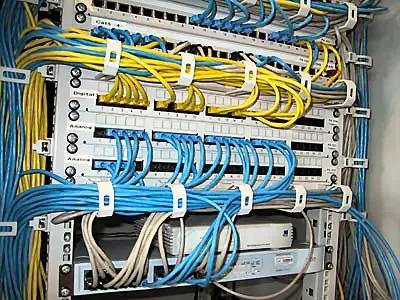
Ethernet patch cables connecting a business network
Ethernet patch cables connecting a business network. Photo: Agon S. Buchholz (asb), CC BY-SA 3.0. Resized and cropped for display.

Business network, Wi-Fi and server support.

A meeting room that drops calls needs a different investigation from a whole office that cannot reach a cloud application. We look at where work fails and which people are affected before recommending new Wi-Fi equipment or a faster internet plan. That helps avoid paying to replace the wrong part of the setup.

Network and Wi-Fi management

We help with office Wi-Fi, network equipment, firewalls and the connections staff need to work. If you have several offices or internet connections, we explain whether changes could make them easier to manage. Our SD-WAN guide explains one option for connecting locations.

Servers and shared infrastructure

We maintain the agreed servers and shared infrastructure behind your business applications, including updates, capacity and replacement planning. Everyday employee help belongs in our managed IT services; an infrastructure project can focus on a defined server or network need without duplicating that broader support arrangement.

Office changes and projects

Planning and coordination for moves, additional locations, hardware replacements, and the technology vendors involved.

Documentation and continuity

Clear records of equipment, accounts, suppliers and important connections help us investigate problems and continue support. Our dental imaging case study shows how a connection problem affected a practice’s X-ray work.

An office move or network change without the guesswork.

Moving premises, adding workspaces or replacing an unreliable network affects more than the equipment. We coordinate the business IT work around your opening dates, staff and other suppliers.

A laptop and notebook set out for project planning
A laptop and notebook set out for project planning. Photo: Oli Dale, CC0. Resized and cropped for display.

The connections your new office needs

We help arrange internet delivery, building access, cabling and the equipment that needs to be ready. You know who is handling each part and whether a delay could affect opening day.

Less disruption to the working day

We plan equipment placement and change windows around your schedule, with recovery options available during the transition. If business phones are affected, we investigate the office network and coordinate with your phone provider; subscriptions and number transfers stay with that provider.

Staff can use the new setup

We check the everyday work your staff depend on, including sign-ins, shared files, printing and business phone connectivity. Checks cover the supported equipment and locations where people will actually work.

A clear finish and ongoing support

You receive the agreed equipment and connection records, vendor contacts and outstanding actions. The proposal distinguishes the move itself from continuing monitoring, maintenance and future changes.

Decide what needs repairing and what needs replacing.

A slow office does not always need a complete network replacement. The cause might be an unreliable connection, an overloaded application server or equipment that no longer suits the way the business works. We investigate the affected parts and explain what the findings support before you approve new hardware.

The replacement decision also considers the equipment's condition, vendor support, capacity and importance to the business.

A device that still switches on may be difficult to support safely; another may have useful life remaining after a configuration or connection problem is corrected.

You receive priorities that separate urgent reliability concerns from improvements that can wait for a planned budget. Where an application or equipment provider needs to be involved, we explain their part in the proposed change. This helps the owner compare a targeted repair with a larger upgrade on a practical basis.

Give guests and specialist equipment appropriate connections.

An office network may serve employees, visiting customers, printers, cameras and equipment maintained by another supplier. Those devices have different access needs. We review how they connect and whether the arrangement gives each group access appropriate to its work.

A visitor needing internet access should not automatically receive the same access as an employee working with company files. Similarly, a specialist supplier's remote connection needs a clear purpose and an owner who approves it. We discuss suitable separation and access arrangements for the equipment and applications involved.

Changes need to preserve legitimate business workflows, such as printing, scanning or access to a vendor-supported application. We coordinate with the responsible supplier where necessary. Specialist clinical, production and building-control systems remain with their qualified providers; our work concerns the surrounding business network and agreed connections.

Budget for the whole network project.

Equipment prices are only part of an office network quote. Cabling, installation, building access, internet lead times, subscription renewals and the time needed to move staff onto the new setup can all affect the project. A realistic proposal identifies those dependencies early.

We separate one-time work from continuing support and explain which costs belong to other providers. For a business with several locations, we also consider the connections and applications shared between sites so one office's change does not overlook another team's needs. Our managed IT services provide the broader home for ongoing staff support and maintenance after the agreed project is complete.

What happens if your internet connection goes down?

An internet outage can interrupt cloud applications, business phones, card payments and remote access at the same time. We discuss which of those services your business depends on and what staff could keep doing while the connection is unavailable.

Choose a fallback that suits the office

A second connection may help, but it needs to suit the office and the equipment using it. Mobile coverage, available capacity, power and whether both connections depend on the same underlying service can affect the result. We explain those limitations before recommending a backup connection or changing network equipment.

Understand what will keep working

The proposed arrangement should also explain whether switching connections is automatic or needs assistance, what can continue working and who contacts the internet provider. That gives the owner a practical picture of the fallback and its cost, rather than assuming a second subscription solves every outage.

Before you get started

Questions about IT infrastructure and network management.

Have a question about your own setup? Talk with Charles.

Can you help with unreliable office Wi-Fi?

Yes. Tell us where staff lose the connection, which tasks are affected and whether the problem happens throughout the office or only in particular rooms. We investigate the supported network and its connection to the internet before recommending equipment. Coverage, capacity and a fault elsewhere in the setup can require different fixes, so another access point is not automatically the answer.

Do you manage industrial or building-control systems?

We support the surrounding business IT and coordinate with the qualified vendors responsible for operational equipment and specialized systems.

Will you replace all our existing equipment?

No replacement should be assumed before the equipment and the problem are understood. We consider its condition, support status and role in the business, then explain whether repair, reconfiguration or replacement makes sense. The recommendation should separate an immediate reliability or security concern from an improvement that can wait, with the cost and likely interruption made clear.

Can you help when office internet is slow but the internet provider says it is working?

Yes. The problem may involve Wi-Fi coverage, office equipment, a computer or the application being used as well as the internet connection. We investigate the supported parts of your setup and share useful findings with the provider when their help is needed. This helps avoid replacing equipment before the cause is understood.

Can we hire you for an office move while keeping our existing IT provider?

We can discuss a defined relocation or network project with your business and current provider. The plan needs clear responsibility for the new connection, equipment, access and timing, including work handled by the building or cabling contractor. You can keep ongoing support separate from the move.

Let’s talk about your IT.

Tell us what's working, what's frustrating, and where you need help.